How to Check Bitcoin Network Activity Without Technical Knowledge

Understanding what’s happening on the Bitcoin network doesn’t require technical skills or advanced tools. By using publicly available blockchain data, anyone can get a clear picture of whether the network is busy, calm, or experiencing delays. This guide walks you through the process step by step using Blockchain.com.
Step 1: Open the Blockchain Charts Section
Start by visiting blockchain.com.
At the top navigation bar, locate the three-dot menu to the right of the “Institutional” option. Click on it, then select Charts from the menu.
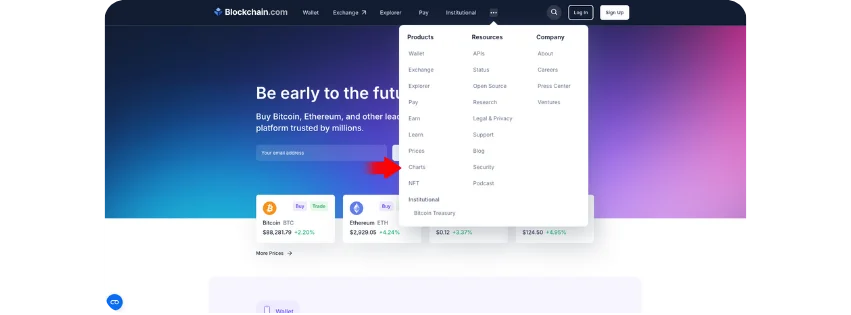
This will take you to the Blockchain Charts section, where high-level network data is displayed in a clear and visual way.
Step 2: Understand the Blockchain Charts Overview
On the Charts page, you’ll first see a general overview of Bitcoin network statistics. Focus on the top “Popular Stats” area, which highlights key metrics such as:
Confirmed Transactions Per Day – shows how many transactions are being processed daily.
Mempool Size – indicates how many transactions are waiting to be confirmed.
Average Block Size – reflects how full recent Bitcoin blocks are.
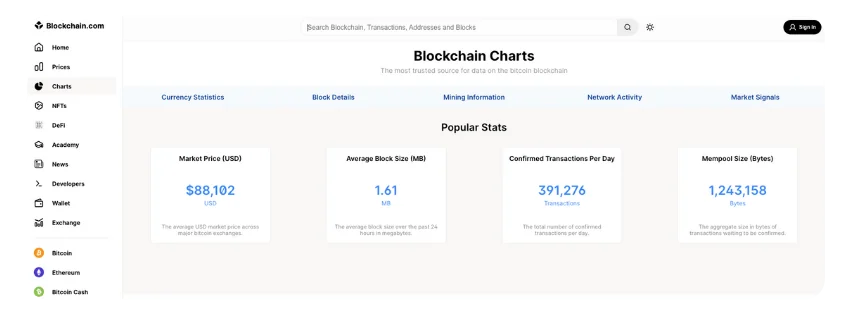
These numbers help you quickly understand whether the network is under heavy use or operating normally. Higher values usually mean more congestion, while lower values suggest smoother activity.
Step 3: Open the Bitcoin Network Page
Next, look to the bottom-left area of the Charts interface and click on Bitcoin.
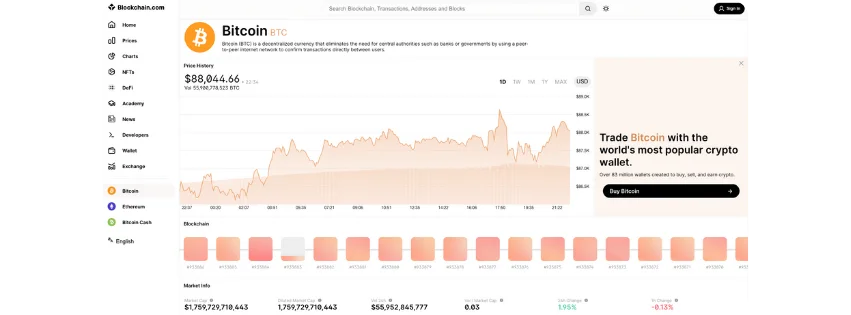
This action takes you to Bitcoin’s main network page, where real-time activity is visualized using colored blocks and transaction data.
Step 4: Read the Bitcoin Network Activity Page
On the Bitcoin page, you’ll find several useful indicators that give instant insight into network conditions:
Latest Transactions – shows recent Bitcoin transfers happening on the network.
Latest Blocks – displays newly mined blocks and how many transactions they include.
Average Confirmation Time – estimates how long transactions are currently taking to confirm.
Together, these elements help you understand how active the network is and whether transactions are likely to confirm quickly or face delays.
Conclusion
By following these simple steps, you can check Bitcoin network activity in just a few minutes, without charts analysis, technical jargon, or advanced knowledge. This information is especially useful when deciding when to send a transaction, as network congestion directly affects confirmation times and fees.
Bitcoin’s transparency allows anyone to observe its activity in real time, and tools like Blockchain.com make that data accessible to everyone.